Elementor Pro Plans Explained: Which One Fits Your Site?
Most people searching for the Elementor Pro price already know they want Pro. The real question is which plan, and whether a cheaper route is worth the risk. Elementor's pricing page lists five plans, and the difference between them is not just the number of sites. Some features you might assume are "Pro" are missing from the entry plan.
This guide walks through what each plan actually includes, how to match a plan to the site you are building, and what happens if you stop paying. Plan details below were checked against Elementor's own pricing and help pages on 13 October 2026. Elementor changes prices and promotions often, so always confirm the final amount at checkout.
Direct Answer
If you are building one simple brochure site and only need the Theme Builder and basic Pro widgets, the entry Essential plan can work, but it has no Popup Builder, no custom code or CSS, no eCommerce widgets, and form submissions are not stored in WordPress. For a business site that captures leads or sells online, Advanced Solo (one site) or Advanced (three sites) is usually the sensible minimum. Freelancers and agencies managing many client sites should compare Expert (25 sites) against buying separate licences per client.
The Five Plans at a Glance
Elementor's pricing page describes the plans like this. Prices start from $60 a year for the entry plan, billed annually; the page shows renewal at the regular rate, so a first-year offer is not the long-term cost.
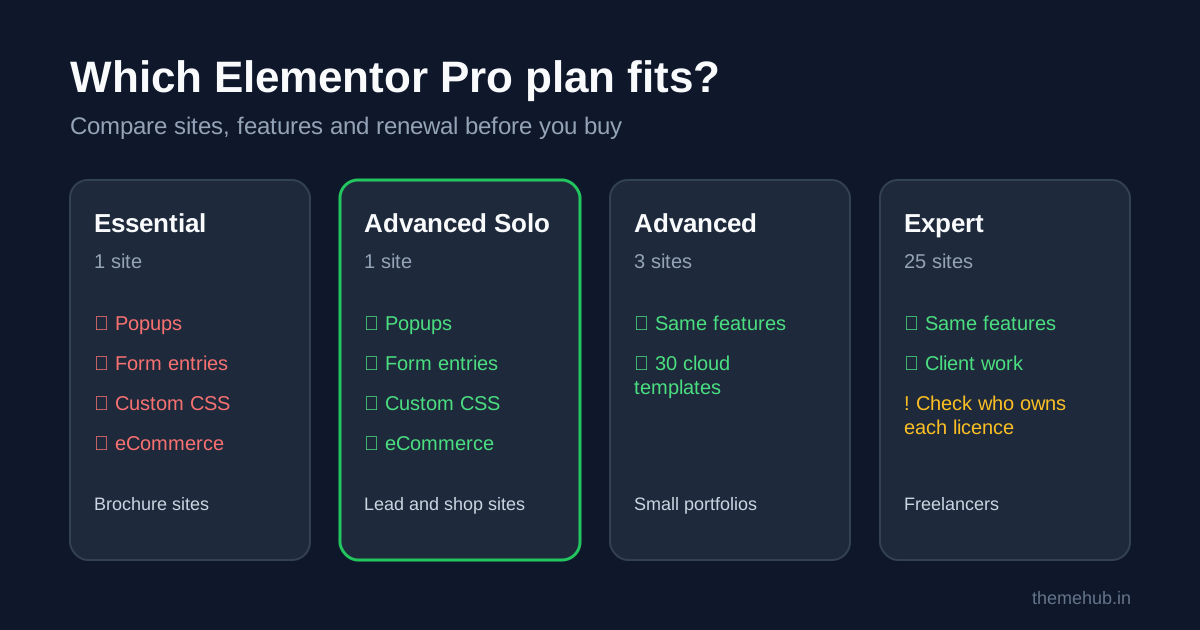
- Essential, 1 site. 57 Pro widgets, Theme Builder, 10 cloud templates, Form Builder and dynamic content. Custom fields and custom post types are not available in dynamic content, form submissions are not available, and Popup Builder, custom code and CSS, eCommerce features and Collaborative Notes are not included.
- Advanced Solo, 1 site. The full Pro editor: 85 Pro widgets, 20 cloud templates, Popup Builder, custom code and CSS, eCommerce features, form submissions and dynamic content with custom fields and post types.
- Advanced, 3 sites. The same feature set as Advanced Solo, with 30 cloud templates.
- Expert, 25 sites. The same feature set, with storage for 5,000 cloud templates. Aimed at freelancers who build many sites.
- One, 1 site. Everything in the Pro plans plus a monthly pool of 25,000 "One credits" shared across AI features, image optimisation, accessibility fixes, cookie consent and email features.
The jump from Essential to Advanced Solo is the one that matters most for business sites, so it is worth understanding before you buy.
What Essential Leaves Out (and Why It Matters)
On paper Essential looks like "Elementor Pro for one site". In practice four gaps catch people out:
- No Popup Builder. If you planned a newsletter popup, exit-intent offer or cookie notice built in Elementor, you will need another tool.
- No form submissions. The Form Builder is included, but submissions are not stored and managed inside WordPress on this plan. You will rely on email notifications or an integration, and a single misrouted email can mean a lost enquiry.
- No custom code or CSS. Small layout fixes that a developer would normally add in the element's Custom CSS field have to go elsewhere, usually the theme customiser or a child theme.
- No eCommerce widgets. If you run WooCommerce and want to design product pages, cart or checkout with Elementor, Essential will not cover it.
None of these are deal-breakers for a five-page brochure site. They are deal-breakers for a lead-generation or shop site, which is why many owners end up upgrading within months.
How to Choose the Right Plan
Answer these questions in order. The first "yes" usually decides the plan.
- Will you build sites for clients? Read Elementor's licence terms for client work first. If you manage more than three sites, compare Expert with separate per-client licences. Separate licences are often cleaner, because the client owns their own renewal and you are not responsible for their updates forever.
- Do you sell online with WooCommerce? You need eCommerce features, so Advanced Solo or above.
- Do you collect leads through forms or popups? You need form submissions and probably the Popup Builder, so Advanced Solo or above.
- Do you display custom fields or custom post types, for example property listings, team members or course details? Essential's dynamic content excludes these, so Advanced Solo or above.
- Is it a simple brochure site that you will rarely change? Essential may be enough, as long as you accept the gaps above.
The One plan only makes sense if you would genuinely use its bundled extras, such as image optimisation or accessibility scanning, and would otherwise pay for separate tools. Check what each feature uses in credits before assuming it replaces another subscription.
What Happens If You Stop Renewing
This is the part most buyers skip. According to Elementor's help centre, if you do not renew you will no longer be able to update Elementor Pro or add Pro features, and you may only have limited access to existing Pro features. Everything in the free Elementor plugin keeps working and can still be updated.
Elementor also warns that updating the free plugin while the Pro plugin stays on an old version can cause compatibility problems. In real terms, a lapsed licence means one of two things: freeze both plugins and accept growing security and compatibility risk, or renew. Budget for renewal as a running cost of the site, not a one-off purchase.
If you are choosing a theme at the same time, our guide to choosing a website theme explains why a lightweight theme paired with Elementor usually ages better than a heavy all-in-one theme.
Cheap Licences, "Group Buys" and Nulled Copies
Search results for Elementor Pro are full of offers far below the official price. They usually fall into three groups:
- Shared "group buy" access, where many people use one account or licence. The licence can be cancelled at any time, and you have no direct relationship with the vendor.
- GPL redistributions of the plugin files. The code may be legal to redistribute under the GPL, but the files do not come with a vendor licence key, Elementor's updates through your dashboard, cloud templates tied to your account, or Elementor support.
- Nulled copies with licence checks removed. These are a common route for malware and backdoors, and should never be installed on a business site.
Whichever route you consider, ask the seller three questions: whose account is the licence registered to, how will updates reach the site, and what happens at renewal time. Our premium plugin licence key checklist covers the full set of checks before you pay anyone.
Before You Buy: A Quick Checklist
- List every site that needs Pro now and in the next 12 months.
- Mark which sites need forms with stored submissions, popups, WooCommerce design or custom fields.
- Decide who owns each licence: you or the client.
- Note the renewal date and renewal price, not just the first-year price.
- Check your hosting meets Elementor's system requirements, and that your theme is compatible.
- Keep a backup before activating Pro on a live site.
Frequently Asked Questions
Is the free version of Elementor enough?
For simple pages, often yes. You need Pro for the Theme Builder (custom headers, footers and templates), Pro widgets, and, on Advanced Solo and above, popups, stored form submissions and WooCommerce design.
Can I upgrade from Essential later?
Upgrade options and any pro-rating are set by Elementor and can change. Check your Elementor account or help centre before buying, and if you think you will outgrow Essential within a year, start on the plan you will need.
Does my site break if my Elementor Pro licence expires?
Elementor says free features keep working, but you lose Pro updates and the ability to add Pro features, and existing Pro features may become limited. Plan your renewal so you are never running an outdated Pro plugin.
Is a GPL copy of Elementor Pro the same as a licence?
No. The plugin code may be the same, but a vendor licence gives you official updates, cloud templates and support. A GPL copy does not.
Can ThemeHub help with Elementor Pro?
Elementor Pro appears in our plugins catalogue for reference. Contact ThemeHub support with the edition and number of sites you need, and we will confirm the licence type, update terms and final price before any payment.
Sources
- Elementor, Elementor website builder pricing, checked 13 October 2026.
- Elementor Help Center, What will happen to my website(s) if I don't renew Elementor Pro? (updated 3 June 2026).