WP Rocket Pricing Explained: Plans, Renewals and What You Keep
WP Rocket is one of the few WordPress plugins people search for by price before they search for features. That makes sense: it is a paid-only caching plugin, the licence renews every year, and there is a whole grey market of "group buy" copies promising the same thing for less. Before you pay anyone, it helps to know what the official plans cost, what you keep if you stop renewing, and what you lose.
Everything below was checked against WP Rocket's own pricing page and help documentation on 14 October 2026. Prices are in US dollars and taxes may be added depending on your country, so always confirm the final amount at checkout.
Direct Answer
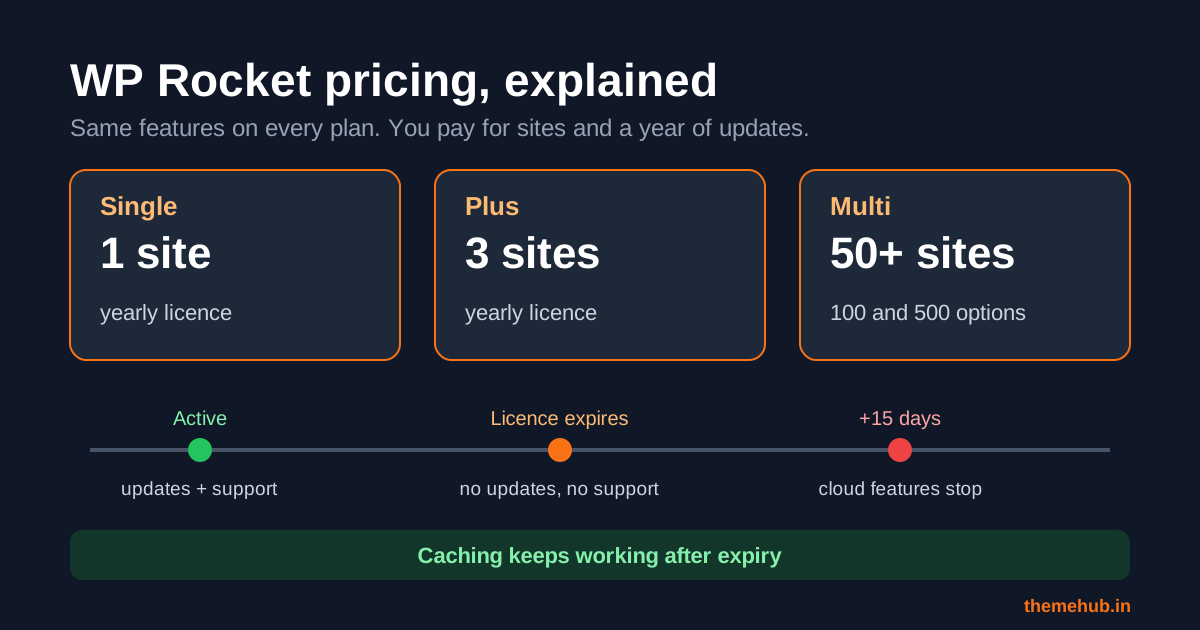
WP Rocket has three plans, all billed yearly: Single at $59.95 a year for 1 website, Plus at $119.95 a year for 3 websites, and Multi from $299.95 a year for 50 websites, with 100 and 500 site options. Every plan gets the same features; you are paying for the number of sites and a year of updates and support. If you stop renewing, the plugin keeps working, but you lose updates, support and the cloud-based features about 15 days after expiry.
The Three Plans at a Glance
- Single, 1 website: $59.95 a year. The right choice for one business site or one online store.
- Plus, 3 websites: $119.95 a year. Useful if you run a main site plus a second brand or a staging copy on a different domain, or if you manage a couple of client sites.
- Multi, 50 websites: from $299.95 a year. Built for freelancers and agencies. The pricing page lets you switch to 100 or 500 sites, and the price changes with the option you pick. Owners of more than 500 sites are asked to contact WP Rocket for a custom licence.
WP Rocket's help centre notes that licences sold before 2025 used different plan names and site limits. If you inherited an older licence from a previous developer, check its type and site count in the WP Rocket account dashboard rather than assuming it matches today's plans.
What Every Plan Includes
There is no "lite" WP Rocket. The pricing page lists the same core feature set on all three plans:
- Caching and cache preloading, with most web-performance best practices applied automatically when you activate it.
- LazyLoad and Delay JavaScript execution.
- Remove Unused CSS, which runs as a cloud service rather than on your server.
- Rocket Insights, a built-in performance hub for tracking key pages.
- RocketCDN for three key pages at no extra cost.
- One year of plugin updates and support.
A 14-day trial is offered, and the pricing page says you can cancel the trial or ask for a full refund within that window if you are not happy with the result. That is the safest way to test it on a real site before committing.
Which Plan Fits Your Site?
Count the live domains you will actually run WP Rocket on during the next year, not the ones you might build someday. Upgrading later is simple: WP Rocket's documentation says you only pay the difference between your current plan and the bigger one.
- One business site: Single. Do not buy Plus "just in case"; the upgrade path makes that unnecessary.
- Two or three sites you own: Plus works out cheaper per site than two Single licences.
- Client work: if you build and maintain sites for clients, compare Multi with letting each client buy their own Single licence. Client-owned licences mean renewals are the client's responsibility, and nothing breaks if you part ways.
Caching is only one part of speed. Large images often matter more, so pair WP Rocket with the steps in our WordPress image optimisation checklist, and choose a lightweight theme in the first place (see how to choose a website theme).
Upgrade vs Renewal: Two Different Payments
This catches a lot of people out. According to WP Rocket's help centre:
- An upgrade lets you use WP Rocket on more websites. It does not change your expiry date.
- A renewal adds another year of updates, support and cloud features.
If your licence has already expired and you also need more sites, WP Rocket recommends renewing first and upgrading afterwards. Otherwise you can pay for an upgrade and still see "expired" in your dashboard.
What Happens If You Stop Paying
WP Rocket is unusually clear about this. When the licence expires, the plugin keeps running and your pages stay cached. What you lose is:
- Plugin updates and access to support.
- Updates to its dynamic exclusion and inclusion lists.
- The free RocketCDN plan.
- The cloud features: Remove Unused CSS, Load CSS Asynchronously and Rocket Insights. These stop working 15 days after the licence expires.
Separate subscriptions, such as a paid RocketCDN or Imagify plan, are not affected and run until their own term ends. A renewal link is emailed before expiry and keeps working afterwards.
The practical risk is not that your site breaks on day one. It is that, months later, a WordPress or WooCommerce update changes something and you are running an old caching plugin with no fixes and no one to ask. For a business site, budget the renewal as a running cost, not a one-off purchase.
Group Buys and Shared Keys: Where the Saving Goes
Searches like "WP Rocket group buy" exist because the yearly price feels high for a small site. Before taking that route, consider how licensing actually works:
- The key belongs to someone else. WP Rocket's documentation says licence owners and resellers can ban a website from using their licence. If you are one of hundreds of sites on a shared key, your access depends on a stranger's account staying active and on them not removing you.
- No support in your name. Support is tied to the licence owner's account, not to your site.
- You cannot verify the file. A zip from a group-buy site may not be the original plugin. A caching plugin touches every page, so a modified copy is a serious security risk.
- Cloud features need a valid licence. Remove Unused CSS and Rocket Insights run on WP Rocket's servers, so they depend on licence validation.
Our guide to checking a premium plugin licence key explains what to ask for before you pay for any premium plugin, from any seller.
Buying WP Rocket Through ThemeHub
WP Rocket appears in the ThemeHub plugin catalogue as a legacy catalogue item. Before any payment, ThemeHub support confirms the licence type, how updates are delivered, site limits, setup help and the final price for your specific site. If the official plan from WP Rocket is the better fit for you, we will say so. You can start that conversation on the support page.
Weighing up page builders at the same time? Our breakdown of Elementor Pro plans covers the other common renewal question for WordPress business sites.
Frequently Asked Questions
How much does WP Rocket cost?
On 14 October 2026, WP Rocket's pricing page listed Single at $59.95 a year for 1 site, Plus at $119.95 a year for 3 sites, and Multi from $299.95 a year for 50 sites. Taxes may apply depending on your country.
Is there a free version of WP Rocket?
No. WP Rocket is paid-only, but it offers a 14-day trial with a full refund if you are not satisfied.
Does WP Rocket stop working when the licence expires?
No. The plugin keeps working. You lose updates, support and the free RocketCDN plan, and the cloud features stop 15 days after expiry.
Can I move my licence to a new domain?
Yes. WP Rocket's help centre explains how to transfer a licence key to another site, for example from a development site to the live domain, from your WP Rocket account.
Is a WP Rocket group buy safe?
It is risky. The licence owner can remove your site, you get no support, and you cannot be sure the plugin file has not been modified.
Sources
- WP Rocket, Pricing, checked 14 October 2026.
- WP Rocket Help Center, What happens if my license expires?
- WP Rocket Help Center, I upgraded, why is my license still expired?
- WP Rocket Help Center, Can I ban or stop a site from using my license?