Paid Memberships Pro Pricing Explained: Free, Standard or Max?
Paid Memberships Pro, usually shortened to PMPro, is one of the longest-running membership plugins for WordPress. It is also one of the most confusing to price, because the plugin itself is free and the paid plans sell different things: a licence for premium Add Ons and support, or a fully hosted service. People searching for a "PMPro licence key" are often trying to work out whether they need to pay at all.
This guide explains what each plan costs, what the free version already does, what a licence actually unlocks, and the one fee that catches many free users out. Prices and plan details were checked on Paid Memberships Pro's own pricing page and release notes on 16 October 2026. They are in US dollars and may change.
Direct answer
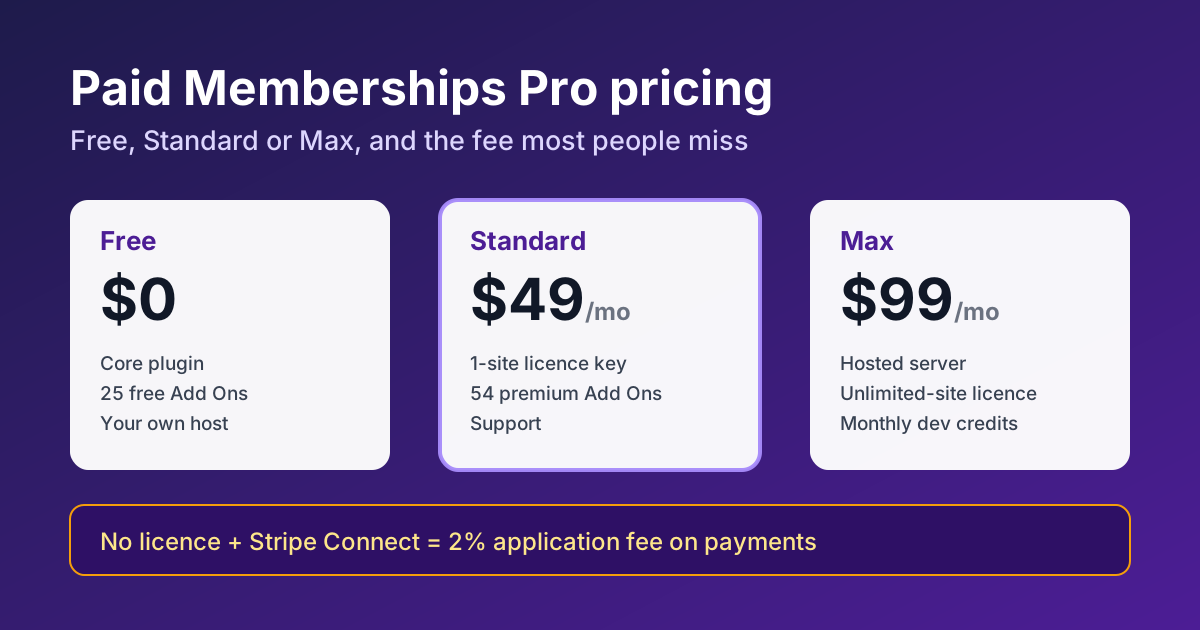
The core PMPro plugin is free and open source. Standard costs $49 a month or $499 a year and gives one site a licence key for 54 premium Add Ons plus support. Max is a hosted plan at $99 a month (listed as normally $149) or $999 a year, and Max 2x costs $299 a month or $2,999 a year. If you run the free version with PMPro's Stripe Connect integration, a 2% application fee applies to payments unless you hold a licence or connect Stripe with your own API keys.
PMPro plans at a glance
| Plan | Price | Licence key | What you get |
|---|---|---|---|
| Free | $0 | Not included | Core plugin, Memberlite theme, 25 free Add Ons, payment gateways, on any host |
| Standard | $49/month or $499/year | 1 site | All 54 premium Add Ons, updates and technical support |
| Max | $99/month or $999/year | Unlimited sites | Dedicated managed server (2 CPUs, 4 GB RAM, 80 GB SSD), migration, 25 development credits a month |
| Max 2x | $299/month or $2,999/year | Unlimited sites | Double the server (4 CPUs, 8 GB RAM, 200 GB SSD) and 50 credits a month |
Annual billing on Standard works out at a little over $41 a month, roughly two months free compared with paying monthly. PMPro also offers a 100-day money-back guarantee on a single payment for its premium plans.
What the free version already covers
The free plugin is not a cut-down trial. It includes unlimited membership levels, content restriction, recurring and one-time payments, and the payment gateways, all on your own WordPress host. For a straightforward subscription site, such as a paid newsletter archive, a members-only resource library or a small course community, the free plugin and a few free Add Ons can be enough.
Where people hit limits is usually one of these:
- A specific premium Add On they need, for example more advanced content drip, extra checkout fields, or integrations with other plugins.
- Needing help. Free users do not get PMPro's technical support.
- Payment fees, explained next.
The 2% Stripe application fee
This is the cost most comparison articles skip. Since PMPro version 3.5, sites that use PMPro's Stripe Connect integration without an active licence pay a 2% application fee on Stripe payments. The release notes give three ways to handle it: pay the fee, buy a licence, or connect Stripe using your own restricted API keys instead of Stripe Connect.
The maths is simple. A site processing $2,500 a month through Stripe Connect pays $50 a month in that fee, about the price of the Standard plan. Below that level, the fee may be cheaper than a licence. Above it, a licence pays for itself before you count the Add Ons and support. Normal Stripe processing fees apply on top in every case.
What the licence key actually does
A PMPro licence is mainly about access and updates. According to PMPro's pricing FAQ, a licence is required to install and automatically update premium Add Ons. If you cancel, the core plugin and the Add Ons you already installed keep working, but you can no longer add new premium Add Ons or update the existing ones, and you lose support and premium tutorials.
That last point matters for security. A membership site handles logins and payments, so running premium Add Ons that can no longer be updated is a real risk over time. If you stop paying, plan to remove or replace premium Add Ons rather than leave them frozen.
It is also why "PMPro with licence key" offers from third-party shops deserve caution. The plugin code is GPL, but a working licence key comes from PMPro's own account system. Our premium plugin licence key checklist explains how to confirm that a key is genuine and tied to an account you control before you rely on it.
Is the hosted Max plan worth it?
Max bundles a dedicated managed server with membership-aware page caching, Cloudflare CDN, object caching, daily backups, transactional email (250 a day on Max), free migration and monthly "Do It For Me" development credits. PMPro lists the base Max server as suited to roughly 0 to 1,000 orders and up to 2,000 monthly active users.
It makes sense when the membership site is the business and you want one company responsible for the plugin, the server and changes. It is harder to justify if you already have good hosting and a developer, or if the site is small. Compare it with the cost of Standard plus your current hosting plus the time you spend on caching and email setup. Membership sites need caching that does not show one member's page to another, which is one of the things Max handles for you.
Which plan should you choose?
- Testing or a simple members area: start on Free. Use your own Stripe API keys if you want to avoid the 2% fee.
- A growing paid membership on your own host: Standard, billed yearly once you are sure. It removes the fee and gives you every premium Add On and support for one site.
- Several membership sites, or no technical help in-house: Max, since the licence covers unlimited sites on the server and setup work comes from the monthly credits.
- A busy established site: Max 2x, after checking your real order volume and active members against the plan guide.
Checklist before you pay
- List the Add Ons you actually need and check whether each one is free or premium.
- Look at last month's Stripe volume and work out what 2% of it would cost.
- Decide whether you will connect Stripe through Stripe Connect or your own keys.
- Check that your host and caching setup exclude logged-in member pages from page cache.
- Buy from Paid Memberships Pro directly so the licence is tied to your account and email.
For page speed on a membership site, our WP Rocket pricing guide and WordPress image optimisation checklist cover the most common add-ons people pair with PMPro. You can browse the wider plugin collection, or ask our support team if you are unsure which setup fits your site.
FAQ
Is Paid Memberships Pro free?
Yes. The core plugin, the Memberlite theme and 25 Add Ons are free. Paid plans add premium Add Ons, support or hosting.
How much is a PMPro licence?
The Standard plan, which includes a one-site licence, is $49 a month or $499 a year. Max plans include licences for unlimited sites on their server.
Does PMPro take a percentage of my sales?
Only in one case: without a licence, payments through PMPro's Stripe Connect integration carry a 2% application fee. Using your own Stripe API keys or holding a licence avoids it.
What happens if my PMPro licence expires?
Your site keeps working, including installed Add Ons, but you cannot install new premium Add Ons, update existing ones or get support.
Can I get a refund?
PMPro offers a 100-day money-back guarantee covering a single payment made in the last 100 days, monthly or annual.
Sources
- Paid Memberships Pro, Pricing and Plans, including the pricing FAQ, checked 16 October 2026.
- Paid Memberships Pro, PMPro v3.5 release notes (changes to Stripe application fees).
- Paid Memberships Pro Documentation, Install and Update Add Ons.